
Egg Chair Listing Assets: Match Each Variant
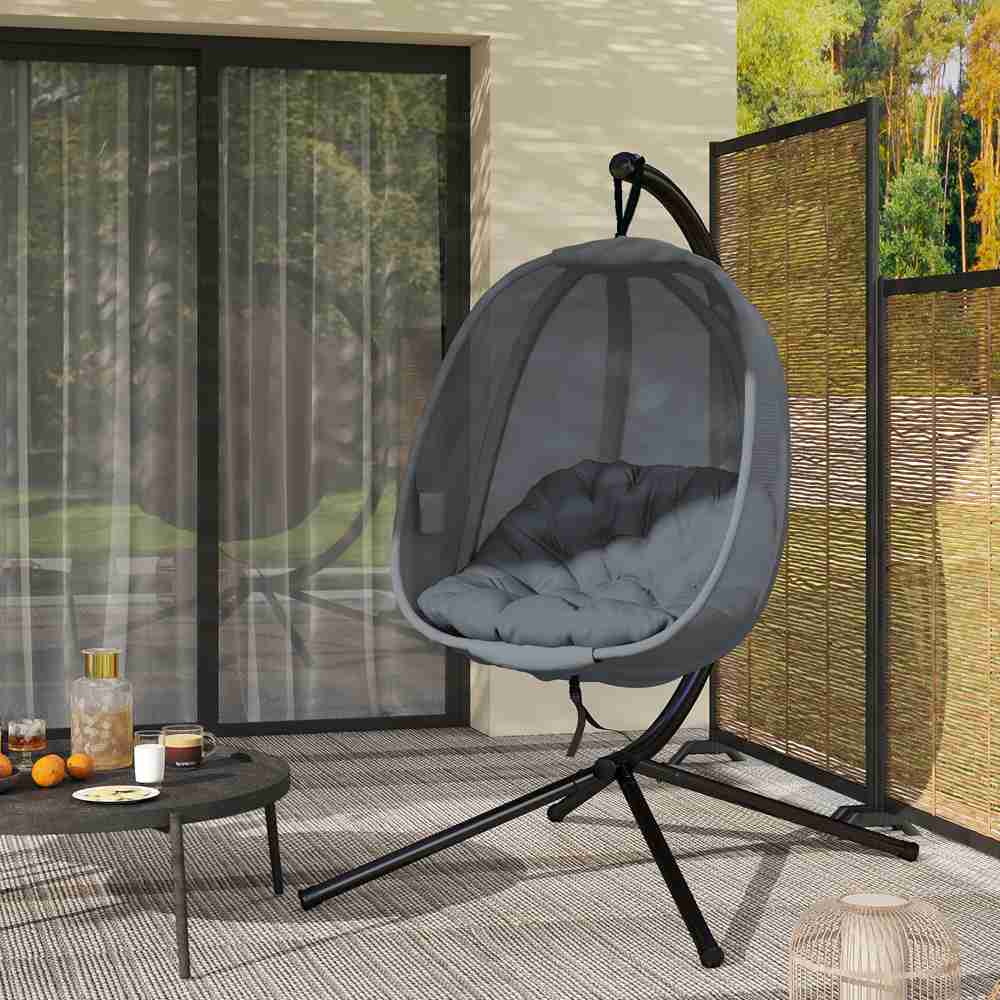
The clean catalogue view is a starting reference for the grey chair’s appearance. Link the image to the exact offered variant and its confirmed supply scope.
A wholesale egg chair asset set should connect each offered variant to the correct product pictures, included-component description and confirmed retailer information. Give the variant one stable reference, identify the purpose of each image and keep a record of approved changes. This helps a retailer present what the customer will receive without borrowing a photograph or feature from a similar chair.
The Egg Chair Grey listing provides a useful example: the catalogue presents a complete-chair view, an angled scene and an annotated detail. These images answer different visual questions. A wholesaler preparing them for a retail customer should keep their roles clear and confirm which offered version each one represents.
Start with the variant the retailer will actually sell
Put the supplier product reference and the retailer’s intended product code beside the product URL. Record the selected colour or other agreed option in the same row. If a supplier uses one catalogue page for several options, ask which option the offer covers. A retailer should be able to trace a chosen image back to that specific offer rather than only to the general egg chair family.
Create separate rows where the offered chair, cushion or other included components differ. Do not assume that changing a colour name leaves every other feature unchanged. Where the supplier confirms several retail options share an image, record what the shared image represents and which option details need their own picture or explanation.
Give every picture a job in the asset set
Use a complete-product view to introduce the overall appearance. An angled view can show how visible components relate to each other. A detail image can focus attention on an area that is difficult to see in the full view. Label those roles in the handover sheet so the retailer does not select a close detail as its only product explanation.
For a scene image, identify the chair separately from the surrounding props. A balcony, garden background or nearby furnishing may be part of the catalogue styling. The included-product statement should come from the supplier-confirmed offer, rather than from everything visible around the chair. Keep any original annotations readable and ask about any wording the retailer intends to repeat.
The angled catalogue scene adds visual context. Background styling should remain separate from the retailer’s included-product description.
Write an explicit included-components statement
Ask whether the offered unit includes the seat assembly, cushion, support and base visible in the selected reference. Then write a concise statement using the supplier’s confirmed answer. If an item is optional or quoted separately, make that distinction clear in the retailer handover rather than leaving it to a customer to infer from an assembled picture.
Keep the selling unit beside the statement. A retailer may intend to sell one complete chair, while a separate commercial line covers an accessory or another configuration. The images, title and included-product description should all describe the same unit. If a package contains components for assembly, request the applicable information without guessing the assembly arrangement from a catalogue scene.
Asset-set field | Information to retain | Retail handover check
Variant identity | Supplier reference, retailer code and selected option | The offer and asset folder describe the same item
Complete-product image | Image reference and represented version | Visible appearance matches the selected option
Angled or scene image | Image role and product shown | Props are not silently treated as included
Detail image | Feature area and supplier explanation | Detail belongs to the same offered version
Included components | Confirmed contents and selling unit | Title, copy and pictures describe one consistent offer
Product information | Supplier-confirmed wording and supporting reference | Unconfirmed statements remain outside customer promises
Revision decision | What changed, affected options and approval date | Old and new asset sets do not become mixed
Keep product facts separate from image impressions
Write descriptive copy from information confirmed for the selected variant. The presence of a padded cushion can be described in an appearance overview, while composition, care instructions and other specifications need their applicable supplier information. A catalogue annotation is a prompt to confirm the wording that will be used, rather than a reason to expand it into a broader product promise.
Avoid filling an empty field with the closest answer from another chair page. If a retailer needs a particular fact for its product page, send a focused question with the variant reference. Record the supplier’s reply alongside the proposed wording. This is especially useful when a detail image highlights one feature but leaves the rest of the cushion or chair specification unstated.
This supplied detail image contains fabric and side-pocket annotations. Keep the image tied to its catalogue version and confirm any corresponding retail wording.
Check the customer journey through the pictures
Read the asset set in the order a retail customer will encounter it. The first image and title should identify the offered chair. Following images should clarify the same item, with details or alternative views that answer useful questions. Check that a change in background or camera angle has not accidentally introduced another option into the sequence.
Then compare the image sequence with the included-components statement. A customer should not need to work out whether a cushion is part of the offer or only shown as styling. Where a supplier has not supplied a suitable image for an option, mark that gap in the handover and request the needed asset. Reusing a picture that shows a materially different product creates a larger problem than an honestly incomplete internal asset list.
Update the set when the offered variant changes
When a supplier proposes a change, identify the affected retailer options and the assets that need replacement. A revised cushion appearance may affect the complete-chair view, detail image and included-product wording together. Keep the old set identifiable while the retailer confirms which version its current inventory and new orders represent.
Maintain one handover row per offered variant, with image references and confirmed contents.
Record who approved the asset set and which supplier response it follows.
Send a clear change notice when an image or product statement is replaced.
Use the product directory to identify the relevant listing and send variant-specific questions through Changxiang Household’s contact page. Related purchasing articles support the wider process, while the asset sheet keeps the retail offer consistent.
Frequently Asked Questions
Can one full-chair photograph represent every colour option?
Use it for another option only where the supplier confirms what it represents and the retailer can describe the option accurately. A shared family name alone is insufficient to map the image.
Should the retailer copy every annotation printed on a picture?
Confirm the intended wording and its application to the selected variant first. Keep the supplied image identifiable and do not turn a narrow annotation into an unsupported wider claim.
What is the simplest useful retailer handover?
Provide the exact variant reference, a coherent image sequence, the confirmed included-component statement and the product facts needed for that offer. Add an open-question list for information still awaiting a supplier answer.
Hanging Egg ChairsRetail Product AssetsVariant ManagementWholesale MerchandisingSupplier Documentation